



Introduction
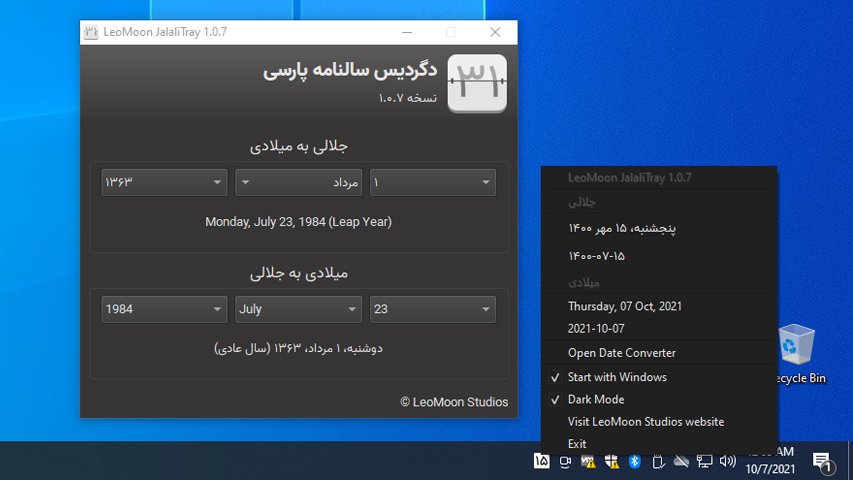
LeoMoon JalaliTray is a desktop system tray calendar and date converter. It shows the current Jalali and Gregorian dates, provides clipboard actions for both formats, and opens a converter for Gregorian and Jalali dates.
The application is being modernized as a cross-platform Python and Qt 6 project. It supports Windows, macOS, and Linux with a shared codebase and native release packages for each platform.
Features
- A system tray menu showing the current Jalali and Gregorian dates.
- Gregorian to Jalali and Jalali to Gregorian date conversion, including age calculation and leap-year information.
- One-click copying of formatted Persian dates, ISO-style Jalali dates, and Gregorian dates.
- Light and dark themes that follow the operating system preference.
- Bundled Vazir fonts and day-specific tray icons.
- A cross-platform Start at login option managed from the tray menu.
Usage
- Download the package for your computer from the GitHub releases page . Windows provides x64 and ARM64 installers, Linux provides x86_64 and ARM64 AppImages, and macOS provides an ARM64 DMG.
- Open the application. Its calendar icon appears in the system tray.
- Use the tray menu to copy the displayed Jalali or Gregorian date, open the date converter, change the theme, or enable Start at login.
- In the converter window, select a date in either calendar. The corresponding date, weekday, leap-year information, and age are updated automatically.
Start at login
Use the tray menu’s Start at login option to enable or disable automatic launch for the current user.
- Windows uses the current user’s
HKCU\Software\Microsoft\Windows\CurrentVersion\Runentry. - macOS creates
~/Library/LaunchAgents/com.leomoon.JalaliTray.plist. Copy the application from the DMG to/Applicationsbefore enabling this option. - Linux creates
$XDG_CONFIG_HOME/autostart/com.leomoon.JalaliTray.desktop, falling back to~/.config/autostart/. Keep an AppImage in a stable location before enabling this option, because moving it later invalidates the startup entry.
Supported platforms
- Windows: x64 and ARM64 Inno Setup installers.
- Linux: x86_64 and ARM64 AppImages.
- macOS: one Apple Silicon (ARM64) DMG.